A poster is not a delivery stop
A parcel is delivered and done. A poster goes up, stays up for weeks, gets checked, has to come down by a deadline – and your client wants proof of all of it. Wo ist mein Plakat? follows every poster through that whole lifecycle.
Plan
Pre-plan locations on the map in the console before the campaign starts.
Put up
Your team captures each poster by GPS in the app and can photograph it right after hanging.
Check
See every poster on a shared live map. With the navigation add-on, the app guides your team from location to location.
Take down
Mark posters as taken down and see at any time which ones are still up – so none gets forgotten and costs a fine.
Prove
Send your client a photo report as a PDF, or export all posters as CSV.
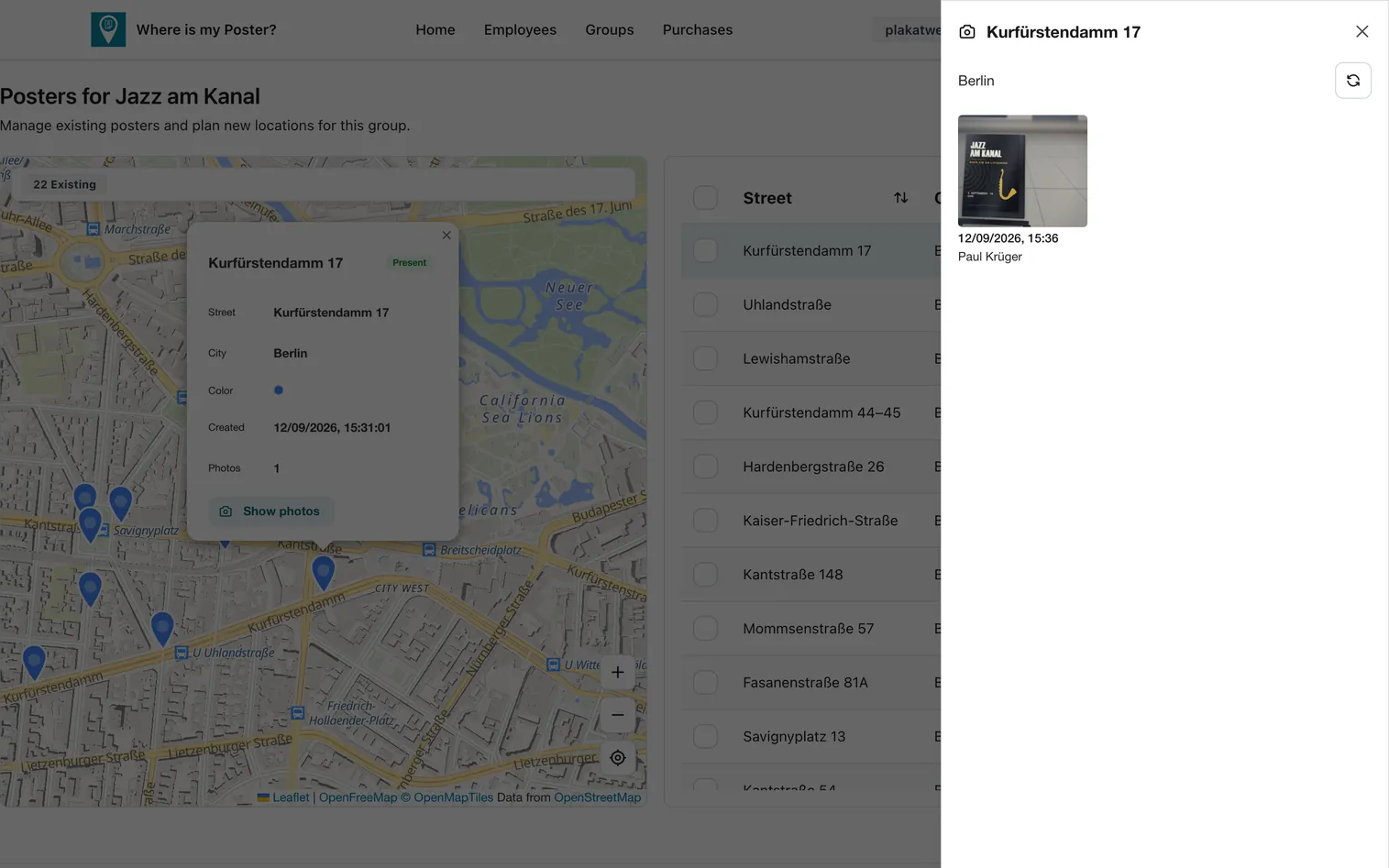
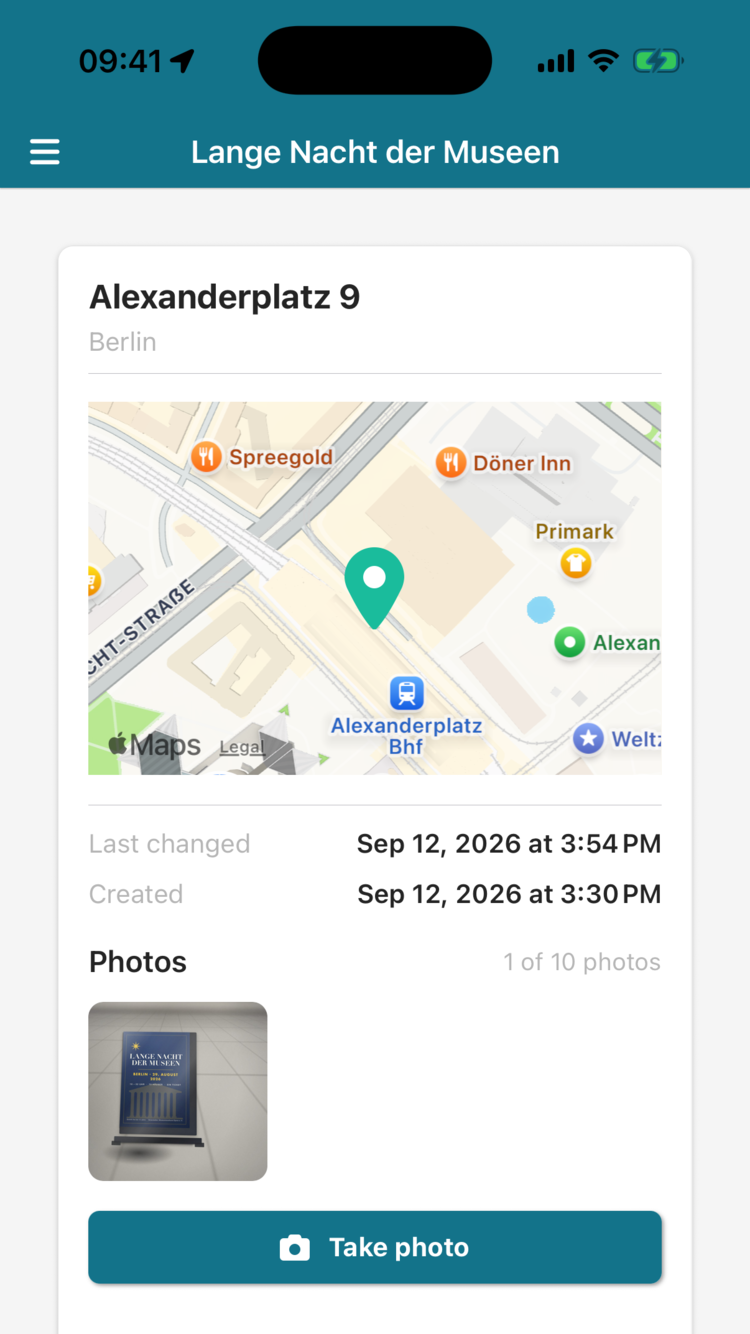
Map-based planning and photos are part of the Professional Edition; navigation mode is an add-on for it.
Poster management or route planner?
There are usually three ways to organise posting: a poster management app, a general route planner, or Excel with Google Maps. All three can work – they are just built for different jobs.
| Wo ist mein Plakat? | Route planner | Excel & Google Maps | |
|---|---|---|---|
| Built for | Posters that stay up for weeks | Stops that are visited and done | Anything, with manual work |
| Status of each poster over the campaign (up / taken down) | Built in | Usually just done or not done per stop | Maintained by hand |
| Capture new locations on site | By GPS in the app | Usually planned from address lists | Copy by hand |
| Separate campaigns and clients | One group per campaign or client | Via tours | One sheet per campaign |
| Photo proof for the client | Photo report per campaign as a PDF | Often included, per stop | Photos scattered across phones |
| Optimising many addresses into tours | Round trip through a group's posters (navigation add-on) | Core strength | Only by hand |
| Seasonal teams and campaign peaks | Licences without a subscription, with a start date you choose | Usually a monthly plan per seat | Free, but no overview |
A route planner fits better if …
- you drive changing addresses every day, like deliveries or service calls
- time windows, vehicle capacities and splitting hundreds of stops across drivers are your main problem
- posters are only a small part of your business
Wo ist mein Plakat? fits better if …
- you run poster campaigns for yourself or for clients
- you need to know at any time which posters are still up, and take them down on time
- your client expects a photo report per campaign
- your team grows and shrinks with the season
Frequently asked questions
What does the outdoor advertising app cost?
The console account is free. Companies use the Professional Edition, from €15 per user and month including VAT: a 1-year licence costs €180, 3 months €60 and 1 month €25 per user. Licences are not a subscription: you buy them with the start date you choose, and they simply expire. The navigation add-on is a monthly subscription at €79 per month including VAT, which you can cancel monthly.
Can the app plan routes?
Yes, with the navigation add-on for the Professional Edition. The app plans a round trip from your team's current location through the posters of a group and guides them stop by stop – ideal for putting up, checking or taking down a whole tour in order.
How do I prove the posting to my client?
In the Professional Edition, your team photographs the posters in the app – up to 10 photos per poster, each with date, time and photographer. In the console, one click turns a group's photos into a PDF photo report with an overview table and every location. In addition, you can export all posters as CSV.
Does it work for seasonal teams?
Yes. In the Professional Edition, licences are not tied to a person and are not a subscription: you buy them with the start date you choose, they simply expire, and you assign them to whoever is working this season.
How do the locations get into the system?
Your team captures each poster on site by GPS in the app. If you want to fix the locations before the campaign, plan them in the console directly on the map; the planned locations then appear in the group.
What does my team need?
A smartphone with the free iOS or Android app. You create your team members in the console, and they log in under 'Professional Login' with their first and last name and your Organization ID. On the first login they leave the password empty and then set their own.
Any other questions? Write to us: mail@avaneo.io